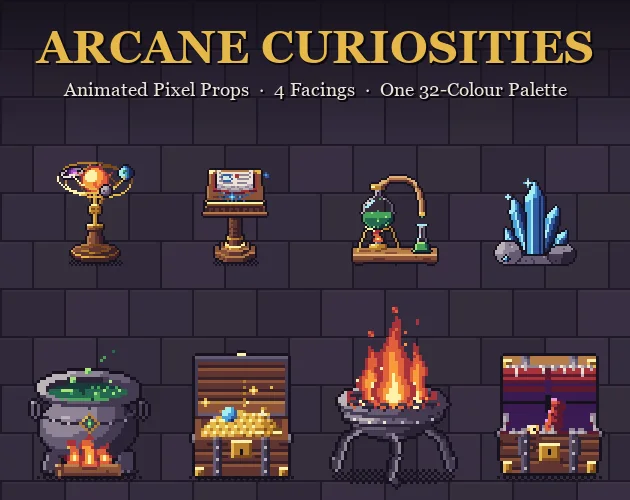
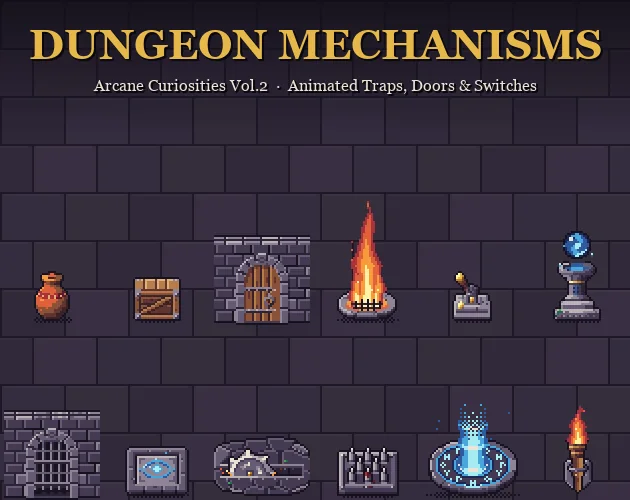
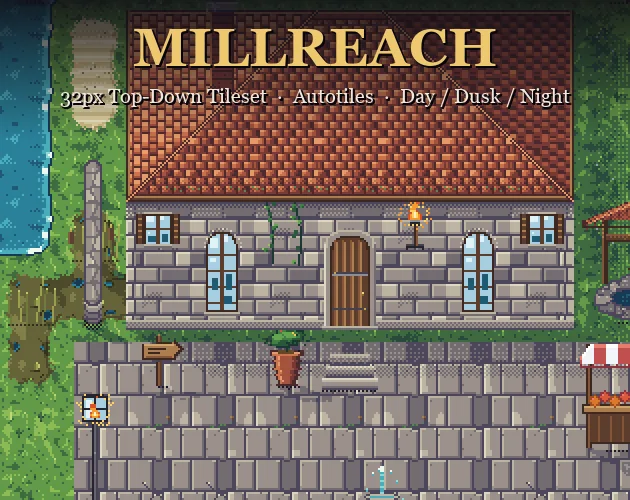
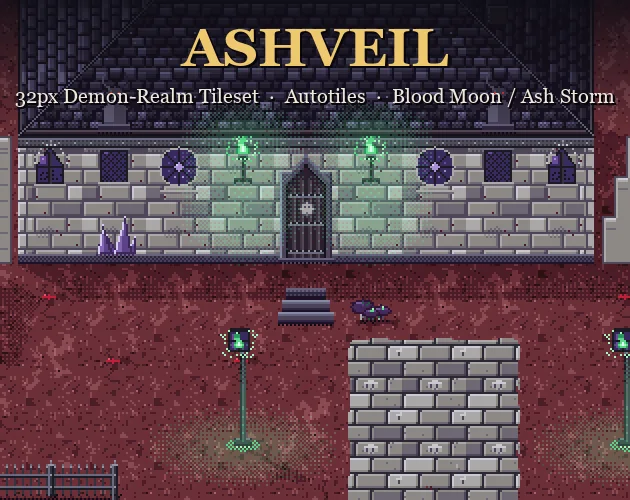
Let AI write how your pixel art is made.
Tessarune is a Windows app that gives your AI coding agent — Claude Code, Codex CLI or Cursor — a pixel-art drawing language, a live Studio and a deterministic renderer. The agent writes each sprite as a short program; Tessarune turns it into PNG, GIF and sprite sheets. You keep the art and the code that makes it.
- Windows 11 x64
- Version 1.3.0
- $32.99 one-time purchase
- No API key
- No network calls
 5×
5×

submit(Cauldron, { size: [48, 48], origin: "top-left", kind: "icon", scale: 1, animate: { fps: 10, duration: 1.2, loop: true }, anchor: { x: 24, y: 45 }, variants: [ { name: "idle-green" }, { name: "idle-violet", repalette: swap("brew", "v") }, { name: "idle-blue", repalette: swap("brew", "b") }, ],});Every frame here was drawn by code.
These props come from Aurum Nocturne’s asset packs. Each one is a program written by an AI coding agent in Tessarune, rendered by the engine and revised after checking the frames. No hand painting, no image model.


Describe it. Your agent writes it. Tessarune draws it.
- 01
Describe what you want
Size, view, light, motion, variants. Studio helps you put the brief together; your agent reads it along with the manuals and templates.
The brief, as the first lines of cauldron.js:
cauldron.js · 1–3// Cauldron over a wood fire — 48x48, top-down 3/4, key light top-left.// Loop: 12 frames @ 10 fps. Bubbles swell and pop, the brew swirls, the sigil pulses, steam drifts, fire flickers.// Variants: brew colour green / violet / blue (ramp swap — no new colours). - 02
Your agent writes the drawing as code
Your coding agent edits a small JavaScript program that uses Tessarune’s drawing commands, then runs the Tessarune CLI to render and check it. There is no API key field: Tessarune never calls an AI.
cauldron.js · 108–116function bubbles(g, t) { const spots = [[-6, 1, 0.0], [3, 2, 0.34], [8, 0, 0.68]]; g.detached("bubbles", () => { for (const [dx, dy, ph] of spots) { const p = (t + ph) % 1; const x = CX + dx, y = MOUTH.cy + dy; if (p < 0.2) g.pixel(x, y, "brew2"); else if (p < 0.45) { g.rect({ x: [x - 1, x], y: [y - 1, y] }, "brew2", { fill: "brew2" }); g.pixel(x - 1, y - 1, "brew3"); } else if (p < 0.62) { - 03
A deterministic render
The engine runs the program at every moment of the loop and places the pixels. Same program, same settings, same pixels. Export PNG, GIF, sprite sheet + JSON, or PNG frames.
4×
A program is a better master copy than a picture.
Reproducible
Same program, engine version and settings give identical pixels. Re-export at another scale, frame count or sheet layout without asking an AI again, and with no per-image fee.
No image model in the loop
Pixels come from shapes, ramps and rules you can read, not from a model trained on other people’s pictures. The license lets you sell both the images and the code you make.
Editable part by part
Parts have names. Shorten a sleeve, move a lamp one pixel, darken a ramp: you or your agent change the lines that draw it, and everything else stays exactly as it was.
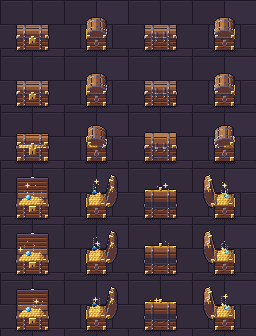
Variants and motions from one source
A colour variant swaps a whole ramp. States such as lit, unlit and ignite are arguments to the same function, so one fix reaches every variant.


The renderer, and everything around it.
Studio
A local studio in your browser. Preview beside code, and it follows every file your agent saves. Motions, frames, palette, layers and notes.
JSON CLI for agents
Create, render, check and export as commands with JSON output. Your agent drives Tessarune the way it drives your build.
Deterministic renderer
The pixel-art compiler and runtime. Both drawing runtimes ship (0.3.0 and 0.4.0), so older work opens and draws the same picture.
25 manuals, Japanese and English
Written for the agent to read: the drawing API, pixel-art rules, motion, 3D rigs, manikin-first characters and review.
Templates, style profiles, examples
Editable starting points, plus a place to keep style rules, references and production notes between sessions.
Review and history
Enlarged reviews, frame inspection, value studies, candidates for flicker or missing pixels, and every accepted version kept.
Export for games
PNG, GIF, sprite-sheet PNG with JSON (frame rectangles, fps, anchor) and PNG frame sequences, at any integer scale.
Japanese and English
Studio, CLI messages, AI handoffs and the manuals in both languages.
What you need.
| Operating system | Windows 11, x64. There is no macOS, Linux or mobile version. |
|---|---|
| Your AI agent | A coding agent that can edit local files, run commands and look at images — for example Claude Code, Codex CLI or Cursor. It is not included; its plan and fees are your own. |
| Download | One ZIP of about 61 MB: the Windows Setup, a portable version, and the documents in Japanese and English. |
| Nothing else to install | The runtime is included. No Node.js, no GPU, no image-generation model to download. |
| Network | Tessarune itself makes no network calls. Studio listens on 127.0.0.1 only. |
| Outputs | PNG, GIF, sprite-sheet PNG + JSON, PNG frame sequences. No MP4, FBX or glTF. |
About the Windows SmartScreen warning
The installer is not code-signed, so Windows SmartScreen may show “Windows protected your PC”. If you downloaded Tessarune from its store page, choose More info → Run anyway. The portable version needs no installation. To check the files, compare their SHA-256 with these values:
Tessarune-1.3.0-Setup.exe
6883468d611b7b0f9159e6e638093c047f5e054c23e4842c6aa1eabef282c75b
Tessarune-1.3.0-windows-x64.zip
131c5819a815181073fa9807b2b8b17b31460eaf2eb920bfae0aab975769d0a9
One purchase. Yours to keep.
$32.99
USD, one-time purchase · Tessarune 1.3.0
Buy on itch.ioYour AI coding agent and its subscription are not included. Windows 11 x64 only.
- Future Tessarune updates released as part of this product, including major versions, at no extra charge — delivered through the store you bought from.
- No account, no licence key, no online activation, no expiry.
- Sell the images, animations and code you make. See the license.
- One purchase covers one person, on the devices they control.
The license, in plain words.
The full end user license agreement is included in the download, in English and Japanese. The Japanese version is authoritative; this summary does not replace it.
- One purchase, one person. Install it on the devices you control. Each additional user needs their own purchase.
- What you make is yours to use and sell. Images, animations, video and the artwork code you create, including works built from the bundled samples and templates, commercially or not, with no revenue share.
- The tool itself stays with you. No resale, redistribution or sharing of the application, engine or manuals. Your AI agent may read the manuals and run the CLI to help your own work.
- Third-party material is yours to check. Characters, references and AI-service terms you bring in follow their own conditions.
Questions before buying.
Do I need an API key?
No. Tessarune has no API key field and no AI settings, because it never contacts an external service. Your own coding agent runs the Tessarune CLI on your PC. Whether that costs anything depends on the plan behind the agent.
Which AI should I use?
Any coding agent that can edit files, run commands and look at the resulting image. No model is guaranteed by name — they change too quickly for a list to stay true. Tiles, effects and backgrounds tend to come out cleanly; human figures take a few rounds, and the review, history and notes are built for those rounds. A top-tier model is not required.
Can I use an ordinary chat window?
Working directly needs an AI that can reach your files and run the CLI, which a chat website usually cannot. You can still ask a chat for code and paste it into Studio yourself.
Is this an automatic AI drawing service?
No. No AI model is bundled. You describe what you want, look at the results and decide what to change. A requested style or quality is not guaranteed in one attempt.
Will I get the same pixels again?
Yes, for programs that do not depend on the clock or unseeded randomness: the same source, seed, settings and engine version give the same pixels. An AI will not necessarily write the same code twice from the same prompt.
Can I sell what I make?
Yes. The license permits commercial use, editing, publication and sale of the images, animation, video and artwork code you create, including works built from the bundled samples and templates, with no revenue share. Redistributing the application, engine or manuals is not permitted, and third-party material is yours to check. License summary.
Can a team use it?
One purchase covers one person on devices they control; each additional user needs a purchase. Using the finished art in a team’s game is a separate matter and is fine.
Does it work offline?
Editing, rendering, review and export work without a connection. A cloud AI agent needs its own connection. Tessarune does not send your works, prompts or references to the seller.
Can it export MP4 or a 3D model?
No. Export PNG frame sequences and encode video in an editor. Tessarune uses 3D joints to pose pixel-art parts, but it is not a mesh editor and does not export FBX or glTF.
How do updates and support work?
New versions are delivered through the store you bought from, as downloads for existing purchasers. For problems or suggestions, contact Aurum Nocturne through that store page with the version, what happened and the steps to reproduce it. There is no guaranteed response time.
See assets made with Tessarune.
Aurum Nocturne’s packs on itch.io were drawn this way. Look at the pixels first.