Why you shouldn’t just mirror 4-directional pixel art
Flipping a left-facing sprite horizontally to get the right-facing one is fast, but it also flips the scene’s light source. On two real 48×48 top-down props from Arcane Curiosities Vol.1, re-lighting the right facing from a fixed top-left key light changes 65.6% of the mimic’s pixels and 59.7% of the chest’s.
What breaks when you flip a sprite
Top-down RPGs almost always share a single directional key light—commonly from the top-left—so walls, floors, characters, and props sit in the same room. When you mirror a left-facing sprite to produce its right-facing counterpart, every highlight that belonged on the upper-left bevel jumps to the upper-right.
In isolation the mirrored frame can look passable. Placed next to a wall, a pillar, or a second chest lit from the left, the eye notices immediately: the curved lid glows on the wrong side, iron bands catch light along their right edge, and cast contact shadows fall toward the light instead of away from it.
Asymmetric details break in a second way. On the mimic, a single eye sits off-centre (EYE_X = -5.25), the fangs and teeth are intentionally uneven, and the tongue lolls to one side. A horizontal flip swaps which side of the body those features belong to, whereas turning the object in 3D space keeps every physical part attached to the same side of the chest.
Measured pixel difference on two 48×48 props
To see how much actually changes—not just in theory—we took frame 0 of the left-facing idle sprite, mirrored it horizontally, and compared it pixel for pixel against the real right-facing render built with the world light fixed at top-left.
On the mimic (idle-left mirrored vs. idle-right), 495 of 754 opaque pixels differ (65.6%). Even on the symmetrical treasure chest (closed-left mirrored vs. closed-right), 429 of 719 opaque pixels differ (59.7%). Nearly two-thirds of the sprite’s shading, bevels, and rim tones shift once the light stays put.
Mimic (48×48, idle frame 0)

Mirrored left (wrong: light flips to the right side of the lid)

Re-lit right (key light stays fixed at top-left)

Pixel diff: 495 of 754 opaque pixels (65.6%) differ
Treasure Chest (48×48, closed frame 0)

Chest: mirrored left

Chest: re-lit right

Pixel diff: 429 of 719 opaque pixels (59.7%) differ
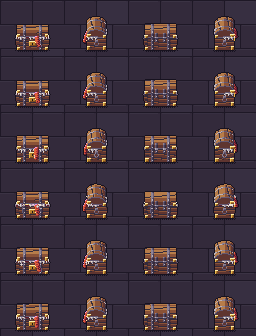
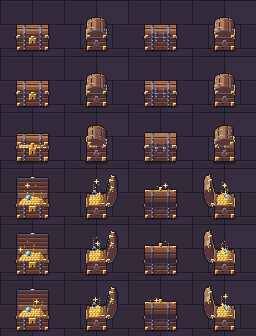
All four facings of the mimic and treasure chest rendered from one model each under a fixed top-left light.
One model, one fixed world light
Both props are written as Tessarune programs (mimic.js and chest.js). Instead of painting four separate bitmaps, each file defines one small oblique-projected 3D model and a table of four floor rotations (FACINGS). Crucially, the key light vector LV lives in world space and is never rotated.
When shading a pixel, the program computes the surface normal in the object’s local coordinates, transforms that normal into world space via F.toW(...), takes the dot product with LV, and quantises the result into four palette ramp steps with level(d). Edge bevels and plank seams also read neighbours relative to the top-left screen light.
mimic.js lines 15–25: LV is declared once in world space (left, slightly front, up). FACINGS only rotates the model’s local axes.
const LV = norm3([-0.6, -0.25, 0.76]);const WOOD = ["w0", "w1", "w2", "w3"], IRON = ["n0", "n1", "n2", "n3"], GOLD = ["g0", "g1", "g2", "g3"];function norm3(v) { const m = Math.hypot(v[0], v[1], v[2]); return [v[0] / m, v[1] / m, v[2] / m]; }const FACINGS = { down: { toL: (v) => [v[0], v[1], v[2]], toW: (v) => [v[0], v[1], v[2]], ext: HD, shadow: 17 }, up: { toL: (v) => [-v[0], -v[1], v[2]], toW: (v) => [-v[0], -v[1], v[2]], ext: HD, shadow: 17 }, right: { toL: (v) => [v[1], -v[0], v[2]], toW: (v) => [-v[1], v[0], v[2]], ext: HL, shadow: 12 }, left: { toL: (v) => [-v[1], v[0], v[2]], toW: (v) => [v[1], -v[0], v[2]], ext: HL, shadow: 12 },};mimic.js lines 208–213 & 272: every hit normal is rotated into world space before taking the dot product with LV, then bucketed into 4 palette steps.
let n = normalOf(bcode, p, bq); if (bflip) n = [-n[0], -n[1], -n[2]]; const nw = F.toW(blid ? lidNormal(n) : n); const c = classify(bid, p, n, bextra); c.lid = blid; c.t = bt; c.d = nw[0] * LV[0] + nw[1] * LV[1] + nw[2] * LV[2]; buf[py * 48 + px] = c;⋯function level(d) { return d > 0.78 ? 3 : d > 0.45 ? 2 : d > 0.1 ? 1 : 0; }Applying this in hand-drawn and code-driven workflows
If you draw sprites by hand, mirroring is still useful for blocking in the silhouette and proportions of the opposite facing. The mistake is stopping there. Treat the mirrored copy as an under-drawing, then repaint the light-facing planes, rim highlights, and drop shadows back to the scene’s key light.
If you write sprites as code, separate object rotation from world lighting from the first line. Once the light vector stays in world space, all four facings inherit every later edit—a narrower iron band, a taller lid, or a shifted tooth—without drifting out of lighting consistency.
- Keep one world-space key light direction for the entire tileset and prop sheet (here, top-left).
- After mirroring a silhouette, re-light curved lids, metal rims, plank seams, and cast shadows back to the lit side.
- Check asymmetric details (eyes, latches, scars, held items) so turning an object does not mirror its anatomy.
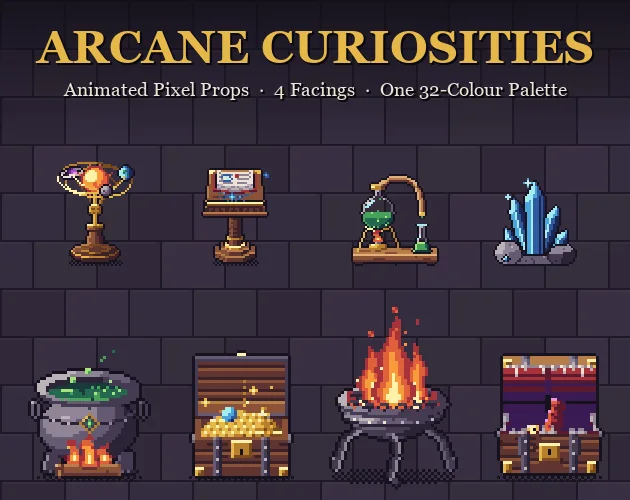 Arcane Curiosities Vol.112 animated props · 52 animations
Every sprite in these notes ships with its source
Tessarune includes all 72 Arcane Curiosities props and their full Tessarune source files as a bonus, so you can inspect, edit, and re-render every technique locally.